Author: foggymtndrifter

  • Privacy Policy

    Introduction

    Welcome to my personal website, FoggyMtnDrifter(“I”, “me”, “my”). Your privacy is important to me, and this Privacy Policy explains how I collect, use, and protect your personal information when you visit FoggyMtnDrifter.com (“Website”).

    Information I Collect

    I strive to minimize data collection and only collect necessary information:

    • Automatically Collected Information: I use Plausible Analytics, a privacy-focused analytics tool, to collect non-personal, aggregated data about Website usage. This includes page views, referral sources, and device types. The analytics are designed to respect user privacy while providing essential insights into website usage.
    • Contact Information: If you voluntarily provide your name or email (e.g., through a contact form or newsletter signup), I collect and store this information securely.
    • Payment Information: When you use the Tip Me feature:
      • Payment processing is handled securely by Stripe, a PCI-compliant payment processor
      • I do not store your credit card information
      • Stripe may collect your name, email, payment method details, and transaction history
      • For recurring tips, Stripe maintains the subscription information needed to process monthly payments

    How I Use Your Information

    I use collected information for the following purposes:

    • To analyze traffic and improve the Website’s content and usability.
    • To respond to inquiries and communicate with you if you provide your contact information.
    • To process your tips and manage recurring subscriptions through Stripe.
    • To send you receipts and important updates about your recurring tips (if applicable).

    Cookies and Tracking

    This website uses minimal tracking. Plausible Analytics is configured to respect user privacy while collecting essential usage data. Stripe may use essential cookies for payment processing and fraud prevention.

    You may view the full analytics collected here.

    Data Sharing and Third Parties

    I do not sell, trade, or share your personal information with third parties, except:

    • With Stripe for payment processing
    • When required by law or necessary to protect my rights

    Data Security

    I take appropriate security measures to protect any information collected. While no system is 100% secure, I strive to use best practices to safeguard data. Payment processing is handled by Stripe, which maintains industry-standard security measures.

    Your Rights

    Depending on your location you may have the right to request access to, modify, or delete any personal information you have provided. For payment-related data:

    • You can cancel recurring tips through the Website’s cancellation page.
    • Payment data is managed by Stripe according to their privacy policy
    • If you need to update payment information or have concerns, please contact me using the contact information below.

    Changes to This Privacy Policy

    I may update this Privacy Policy occasionally to reflect the changes in my practices. Any modifications will be posted on this page with the updated date.

    Contact Information

    If you have any questions about this Privacy Policy, you can reach me at michael@foggymtndrifter.com.
  • Terms of Use

    Introduction

    Welcome to my personal website, FoggyMtnDrifter.com (“I”, “me”, “my”). By accessing or using FoggyMtnDrifter.com (“Website”), you agree to be bound by these Terms of Use. If you do not agree to these terms, please do not use this Website.

    Use of the Website

    • This Website is for informational and personal use only.
    • You may not use this Website for any unlawful purpose or in a manner that could harm, disable, or impair the Website’s functionality.
    • Any unauthorized use of the Website may result in legal consequences.

    Content Ownership and Copyright

    • All content, including text, images, and other media, is owned by me unless otherwise stated.
    • You may not copy, reproduce, distribute, or modify any content without my prior written consent.
    • Any third-party content displayed on this Website is used in accordance with applicable copyright laws.

    Tip Me Feature and Payments

    • The Website offer a voluntary tipping feature that allows you to support my work through one-time or recurring monthly payments.
    • All payments are processed securely through Stripe, a third-party payment processor.
    • By making a payment, you agree to:
      • Provide accurate and complete payment information
      • Have the legal right to use any payment method you provide
      • Pay the specified amount you choose to tip
    • For recurring monthly tips:
      • You may cancel your subscription at any time through the Website’s cancellation page
      • Cancellations will take effect immediately
      • No refunds will be provided for partial months
    • I reserve the right to:
      • Modify or discontinue the tipping feature at any time
      • Refuse any tip at my discretion
      • Change the available tip amounts or payment options
    • All tips are final and non-refundable unless required by law

    External Links

    • This Website may contain links to third-party websites. I am not responsible for the content or privacy practices of those websites.
    • Clicking on any external links is at your own risk.

    Disclaimer of Warranties

    • The information on this Website is provided “as is” without any warranties, express or implied.
    • I do not guarantee the accuracy, reliability, or completeness of any content.
    • I am not responsible for any errors, omissions, or any damages resulting from the use of this Website.

    Limitation of Liability

    • To the fullest extent permitted by law, I am not liable for any direct, indirect, incidental, consequential, or punitive damages resulting from your use of this Website.
    • Your sole remedy for dissatisfaction with the Website is to stop using it.

    Changes to the Terms of Use

    • I may update these Terms of Use at any time without prior notice.
    • Any changes will be posted on this page with an updated date.

    Contact Information

    If you have any questions regarding these Terms of Use, you can contact me at michael@foggymtndrifter.com.

  • New Year, New Website: The Sequel

    Well, here we are again. If you’re reading this, you might be thinking, “Didn’t you just redesign your website in January?” And you’d be absolutely right! In my defense, I can’t help it – I’m like a kid in a candy store when it comes to web development, except the candy is code and the store is my terminal.

    The Backstory

    Back in January, I wrote about my transition to Ghost and how excited I was about the new features it brought. But as any developer knows, the itch to build something custom never really goes away. It’s like having a perfectly good chair but thinking, “You know what? I could probably build a better one… with RGB lighting and a built-in coffee warmer!”

    Why Another Change?

    The truth is, while Ghost is an excellent platform (and I still recommend it for many use cases), I found myself wanting more control over my site’s architecture. I’m a tinkerer at heart, and sometimes the best way to learn is to build something yourself. Plus, I had some specific ideas about how I wanted to structure my content and present it to you, my wonderful readers.

    What’s New?

    This time around, I’ve built the site using Astro, a modern static site generator that’s been gaining popularity for its excellent performance and developer experience. Some highlights of the new setup:

    • Lightning Fast Performance: Static site generation means your browser gets exactly what it needs, nothing more.
    • Content Collections: A more organized way to manage my blog posts and other content.
    • Custom Components: The ability to create exactly the UI elements I want, how I want them.
    • TypeScript Support: Because type safety is like having a safety net while coding – you hope you never need it, but you’re glad it’s there when you do.

    Custom Features

    One of the most exciting aspects of this redesign is the addition of several custom features that enhance both the user experience and the site’s functionality:

    Stripe Integration for Tips

    I’ve implemented a seamless tipping system using Stripe that allows readers to support my work in two ways:

    • One-Time Tips: For those who want to show their appreciation for a specific article or project
    • Monthly Subscriptions: For readers who want to provide ongoing support

    The system is fully integrated with a beautiful modal interface that makes it easy to choose an amount and complete the transaction. Plus, it’s all handled securely through Stripe’s infrastructure, so you can tip with confidence.

    Intelligent Search

    I’ve built a custom search implementation that makes it easy to find content across the site:

    • Real-time Results: As you type, the search updates instantly
    • Fuzzy Matching: Even if you don’t remember the exact title, the search will find what you’re looking for
    • Content Filtering: Search through blog posts, projects, or everything at once
    • Keyboard Navigation: Full keyboard support for power users

    Smooth View Transitions

    One of my favorite new features is the implementation of view transitions, which creates a smooth, app-like experience when navigating between pages:

    • Animated Page Transitions: Elements smoothly animate between pages
    • Persistent Elements: The header and navigation maintain their state during transitions
    • Reduced Layout Shift: Pages transition without jarring jumps or reloads
    • Progressive Enhancement: The site still works perfectly even if transitions aren’t supported

    These features work together to create a more engaging and polished experience while maintaining the site’s performance and accessibility.

    The Development Process

    Building this site was a journey of discovery. I learned more about:

    • Modern web development practices
    • Content management strategies
    • Performance optimization
    • The importance of good documentation (which I’m still working on, by the way)

    What’s Next?

    I promise I’ll try to keep this version around for at least… oh, I don’t know, maybe until the next shiny framework catches my eye? (Just kidding! Maybe.)

    In all seriousness, this redesign represents my commitment to providing you with the best possible reading experience while maintaining the flexibility to experiment and improve. I’m excited to share more content, more projects, and more of my journey in tech with you.

    A Note to My Future Self

    Dear Future Michael,

    If you’re reading this and thinking about another redesign, please remember:

    1. It’s only been a few months
    2. The current site works perfectly fine
    3. Maybe go outside and touch some grass instead?

    But knowing you, you’ll probably ignore this note and start tinkering again anyway. Such is the life of a developer who can’t resist building their own solutions.

    To everyone else: thanks for sticking with me through these changes. Your support means the world, even if I do keep moving the furniture around. Here’s to many more posts, projects, and probably a few more redesigns (but let’s not tell Future Michael that).

    Stay curious, stay coding, and remember: the best solution is often the one you build yourself… even if you have to rebuild it every few months!

  • Introducing ClearProxy: A Modern Interface for Caddy Server

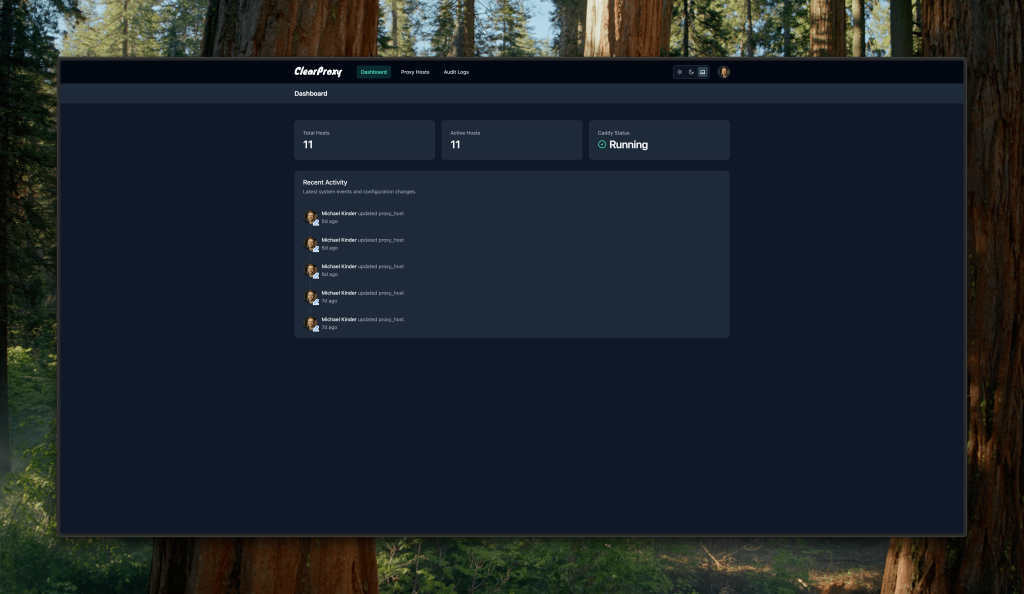
    As a long-time user of Caddy Server, I’ve always appreciated its simplicity, automatic HTTPS capabilities, and robust performance. However, one pain point kept nagging at me: maintaining Caddyfile configurations across multiple servers and projects. That’s what led me to create ClearProxy, a modern web-based management interface for Caddy that focuses on making reverse proxy configuration as straightforward as possible.

    ClearProxy Dashboard

    The Journey

    The idea for ClearProxy was born out of a simple desire: I wanted the power of Caddy without the hassle of manually editing configuration files. While Caddy’s Caddyfile syntax is clean and intuitive, managing multiple proxy configurations across different environments can become tedious. I wanted a solution that would:

    1. Provide a beautiful, intuitive interface for managing proxy hosts
    2. Maintain Caddy’s core philosophy of simplicity and security
    3. Offer advanced features for power users without overwhelming beginners

    Technical Implementation

    I built ClearProxy using modern web technologies that prioritize performance and developer experience:

    • SvelteKit for the frontend, offering a responsive and snappy user interface
    • SQLite for reliable data storage without the complexity of a separate database server
    • Docker for easy deployment and consistent environments
    • Caddy’s Admin API for seamless integration with the Caddy server

    The architecture is deliberately simple: two containers working in harmony – one running the ClearProxy application and another running Caddy server. This setup ensures that users get all the benefits of Caddy (automatic HTTPS, modern security defaults) while enjoying a user-friendly management interface.

    Key Features

    Some of the features I’m most proud of include:

    • Intuitive Proxy Management: Add and configure proxy hosts with just a few clicks
    • Automatic HTTPS: Leveraging Caddy’s built-in ACME client for SSL/TLS certificates
    • Basic Authentication: Easily secure proxied hosts when needed
    • Advanced Configuration: Raw Caddyfile syntax support for power users
    • Access Logging: Built-in monitoring capabilities

    The Rewards

    Building ClearProxy has been incredibly rewarding for a couple reasons:

    1. Learning Experiences: The project pushed me to dive deep into Caddy’s internals, modern web development practices, and container orchestration. Every challenge was an opportunity to learn something new.
    2. Open Source Collaboration: The project is open source, and I’m hoping and looking forward to collaborating with other developers to make it better.

    Looking Forward

    ClearProxy is more than just a personal tool – it’s becoming a project that makes Caddy more accesible to everyone. Future plans include:

    • Enhanced monitoring and analytics
    • Support for more advanced Caddy features
    • Improved documentation and tutorials
    • Community-requested features and improvements

    Try It Yourself

    If you’re using Caddy and want to simplify your proxy management, give ClearProxy a try. The project is available on GitHub, and getting started is as simple as running a few Docker commands.

    mkdir clearproxy && cd clearproxy
    curl -L https://raw.githubusercontent.com/foggymtndrifter/clearproxy/main/docker-compose.yml -o docker-compose.yml
    docker compose up -d

    Conclusion

    Building ClearProxy has been a journey of solving a personal pain point that turned into something much bigger. It’s a testament to the power of open source and the satisfaction that comes from creating tools that make developers’ lives easier. If you’re using Caddy or looking for a more modern reverse proxy solution, I encourage you to give ClearProxy a try and join our community.

  • New Year, New Site

    The start of a new year felt like the perfect time for a fresh direction, and I’m thrilled to share that I’ve officially migrated my site to Ghost. This move represents not only a technical upgrade but also an opportunity to create deeper connections with you, my readers. Alongside this, I’m launching two exciting initiatives: a monthly newsletter and a paid membership tier. Let me walk you through what’s new and why I’m so excited.

    Why Ghost?

    After years with Astro, I decided to switch to Ghost because it provides an all-in-one platform specifically tailored for writers and content creators. Its clean design, robust publishing tools, and built-in support for memberships and newsletters made it an obvious choice. Now, instead of juggling development, I can focus more on writing and engaging with you.

    Ghost also aligns perfectly with my goals for 2025. It’s open-source, which fits my philosophy of supporting open and community-driven technologies, and it simplifies how I can offer new features like subscriptions and exclusive content.

    The Monthly Newsletter

    One of the first features I’m introducing on Ghost is a monthly newsletter. This will be a direct way to stay in touch with everything I’m working on; from blog posts and video content to behind-the-scenes updates and curated links that I think you’ll find inspiring.

    It’s free to subscribe, and I’m aiming to make each edition packed with value, whether you’re here for tech insights, personal reflections, or creative inspiration.

    Introducing Paid Memberships

    I’ve also rolled out a paid membership tier for those who’d like to support my work more directly. It’s a way for me to give back to my most dedicated followers while also creating a sustainable path forward for the content I’m passionate about.

    Here’s what you get as a premium member:

    1. Exclusive Access to a Private Discord Server: Connect with me and other like-minded members in a space designed for deeper discussions, Q&A sessions, and sneak peeks at upcoming projects.
    2. Shoutouts on my YouTube Videos: As a token of my gratitude, I’ll personally thank premium members in my YouTube videos.
    3. Exclusive Content: From detailed tutorials and courses to bonus blog posts, you’ll get access to content reserved only for premium members.

    The paid membership is $5/month, which goes directly toward supporting my ability to create meaningful content. If you’ve found value in what I’ve done over the years, this is a great way to ensure I can keep going.

    What’s Next?

    I’m beyond excited to see how these changes shape the year ahead. I hope this new chapter brings us closer together as a community, and I can’t wait to hear your thoughts on the newsletter and membership perks.

    If you haven’t already, consider signing up for the newsletter or joining the premium membership tier. Your support means the world to me, and it’s what enables me to keep exploring, creating, and sharing.

    Here’s to new beginnings and deeper connections. Thank you for being a part of this journey with me!

  • I’ve moved to macOS.

    For years, I’ve proudly championed open source software. My daily computing revolved around Linux, with its incredible community, transparency, and flexibility. Linux has been my go-to platform for development, productivity, and even leisure. However, after a long and thoughtful deliberation, I recently made the switch to macOS. Yes, as surprising as it might sound coming from someone so deeply rooted in the open source ecosystem, this decision wasn’t made lightly.

    Why macOS?

    My shift to macOS stems from a growing reliance on software that is either unavailable on Linux or lacks sufficient alternatives. Despite the vast array of open source and Linux-native tools, some professional-grade applications that I’ve come to depend on are exclusive to macOS (and Windows, which I’m not keen on using).

    Windows, while ubiquitous, was never a viable option for me due to its closed ecosystem and user-hostile practices, such as forced updates and telemetry. macOS, on the other hand, offers a Unix-based system that feels familiar, with a layer of polish and commercial software support that Linux currently lacks.

    Maintaining an Open Source Ethos

    Switching to macOS doesn’t mean abandoning open source principles. I continue to use open source tools wherever possible. Homebrew, for instance, brings a package management experience akin to APT or DNF. Additionally, tools like Visual Studio Code, Vim, and Docker seamlessly integrate into macOS, allowing me to maintain much of my previous workflow.

    I’ve also found ways to contribute to the open source community from a macOS environment. Whether through cross-platform development or raising awareness about tools that bridge gaps for macOS users, the open source ethos remains a core part of my workflow.

    The Challenges of Linux for Everyday Use

    As much as I love Linux, there are hurdles that can’t be ignored:

    • While Linux has come a long way, some modern hardware still lacks adequate driver support.
    • Certain industries rely on software that simply doesn’t exist on Linux, leaving professionals with limited options.
    • The small market share of Linux on desktops discourages some developers from prioritizing Linux ports.

    Final Thoughts

    Switching to macOS hasn’t dulled my appreciation for Linux or the open source movement. Instead, it’s a pragmatic choice–a compromise to meet my current needs without compromising on quality or ethics. I still run Linux on my servers, contribute to open source projects, and advocate for the community that’s shaped my career.

    My journey highlights the importance of keeping an open mind. While platforms may change, the values that drive us as technologists–innovation, collaboration, and freedom–remain constant. And who knows? Perhaps in the future, the Linux desktop ecosystem will evolve to a point where I can come back home full-time.

    What are your thoughts on balancing open source ideals with practical needs? I’d love to hear from others who’ve faced similar dilemmas.

  • Installing Virtual Machine Manager on Void Linux

    If you’re a fellow Void Linux enthusiast like me, you know the thrill of a lean, customizable system. But sometimes, you might want to run other operating systems within your streamlined Void environment. That’s where virtual machines (VMs) come to the rescue, and Virtual Machine Manager makes it super easy to set them up.

    In this guide, I’ll walk you through the steps I took to get this working.

    Step 1: Installing the Essentials

    sudo xbps-install libvirt virt-manager qemu polkit

    This gets us all the pieces we need; libvirt for virtualization magic, virt-manager for a friendly interface, qemu as our trusty emulator, and polkit for handling permissions.

    Step 2: Getting the Right Permissions

    We need to make sure our regular user account can play with virtual machines. Let’s add ourselves to the libvirt and kvm groups:

    sudo usermod -a -G libvirt,kvm your_username

    (Remember to replace your_username!)

    Step 3: A Quick Log Out and Back In

    Just to be sure the group changes stick, log out of your account and log back in.

    Step 4: A Tiny Bit of Configuration

    Let’s setup a config file for libvirt so it knows what’s up:

    mkdir ~/.config/libvirt && sudo cp -rv /etc/libvirt/libvirt.conf ~/.config/libvirt/ && sudo chown your_username:your_user_group ~/.config/libvirt/libvirt.conf

    Step 5: Tweaking libvirt Settings

    Open ~/.config/libvirt/libvirt.conf in your favorite text editor and find the line that says uri_default. Change it to:

    uri_default = "qemu:///system"

    Step 6: QEMU Permissions

    Edit /etc/libvirt/qemu.conf, setting the user and group to match your username and libvirt respectively. This lets you manage the VMs you create.

    Step 7: Starting the Services

    Void Linux uses runit for services. Let’s enable the ones we need:

    sudo ln -s /etc/sv/dbus /var/service/
    sudo ln -s /etc/sv/polkitd /var/service/
    sudo ln -s /etc/sv/libvirtd /var/service/
    sudo ln -s /etc/sv/virtlockd /var/service/
    sudo ln -s /etc/sv/virtlogd /var/service/

    Step 8: Launch Time!

    That’s it! Go ahead, launch Virtual Machine Manager, and get ready to spin up new virtual machines!


    Bonus Tip: Pump Up the Graphics

    Want smoother graphics in your VMs? Edit a VM’s settings, go to “Video”, select “Virtio”, and check the “3D Acceleration” box.

  • Void Linux: A Pleasantly Surprising and Stable Home

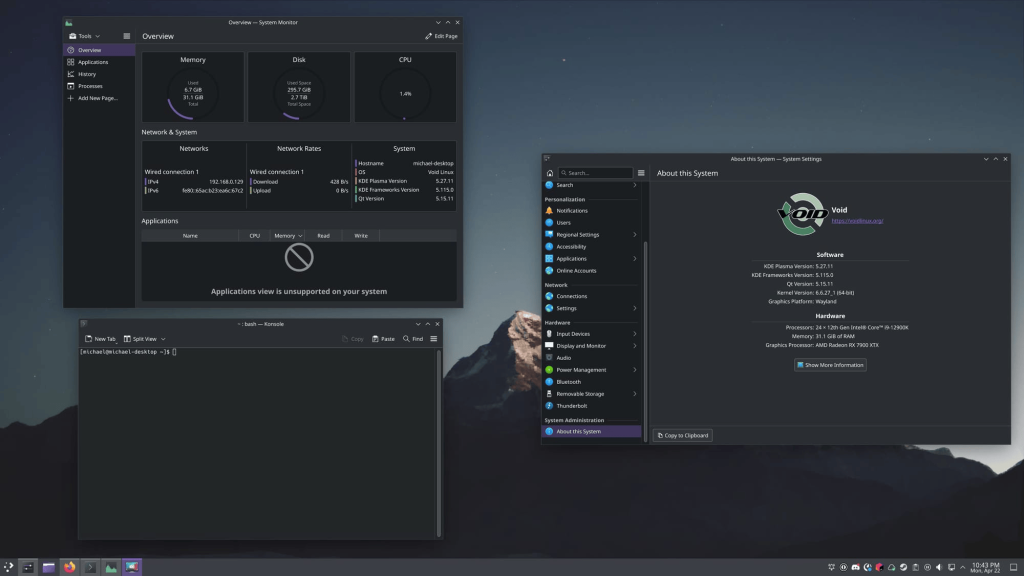
    I consider myself a bit of a Linux distribution wanderer. While there’s fun in exploring, it also means I rarely settle down with one distro for long. That changed when I stumbled upon Void Linux.

    Void Linux Screenshot

    My Solus Story

    For over three years, I was a dedicated daily driver of Solus. Its beautiful Budgie desktop environment, well-curated software selection, and rollilng release model were a perfect fit. I especially appreciated how it offered a modern Linux experience without excessive tinkering.

    Unfortunately, well-publicized infrastructure issues with Solus surfaced, causing me (and many others) concern. However, I’m pleased to say that the Solus project is back on track! This means it’s still absolutely a distro I recommend, especially for those wanting a polished experience with minimal setup.

    But What About Void?

    Despite Solus being back, my time with Void Linux has been incredibly positive. Here’s what surprised me:

    • Instead of the complex systemd suite, Void uses runit. It’s refreshingly straightforward, prioritizing simplicity and a blazingly fast boot process.
    • The X Binary Package System (XBPS) is fast, efficient, and reliable. It allows for building packages from source, giving incredible control over customization.
    • Even as a rolling release distro, I’ve found Void to be incredibly stable. This is likely thanks to its testing practices.
    • Despite being smaller than some distros, the Void Linux community is active and welcoming. The documentation is top-notch.

    Which Is Right For You?

    Both Solus and Void offer compelling reasons for being your home distro:

    • If you prioritize a polished out-of-the-box experience, a curated software selection, and want minimal tinkering, Solus is a fantastic solution.
    • If you enjoy customization and don’t mind a bit more hands-on setup, Void Linux could be your new favorite.

    Sticking Around for Awhile

    While I loved the Solus experience, I’ve been absolutely blown away by Void’s reliability, speed, and philosophy. After my experience, I don’t see myself distro-hopping anytime soon; though it’s wonderful to have Solus back as a strong option too!

    If you share my priorities, I strongly encourage you to give Void Linux a chance. If you prefer a more polished experience, definitely check out the revitalized Solus project. Either way, you might just find your new Linux home!

  • Rocky Linux: A User’s Guide to Contributing

    I’ve always been passionate about open source software. The idea of collaborative communities building powerful tools freely available to everyone resonated deeply with me. Yet, for a long time, I was just a user, a beneficiary. I’d never taken the plunge into actually contributing to an open source project.

    That all changed when the CentOS landscape shifted. Like many, I was caught off guard by the news around CentOS 8. Reading Greg Kurtzer’s announcement of Rocky Linux on the CentOS blog, something clicked. This was my chance to put my belief in open source into action.

    With a mix of excitement and apprehension, I joined the Rocky Linux Slack (which later transitioned to Mattermost). I had zero open source contribution experience, yet I found a welcoming community eager to bring enthusiastic people on board. I started by talking to the then Web Team Lead, and soon I was making small contributions to the Rocky Linux website.

    My involvement grew quickly. As my contributions increased, so did my sense of ownership in the project. Before I knew it, I was leading the Web Team, overseeing the development and maintenance of the main Rocky Linux site. It was incredibly rewarding!

    I’ve since scaled back my involvement in that specific role, but remain integral in shaping the project’s visual identity as the Design Team Lead. The thrill of helping a crucial open source project remains the same.

    How You Can Make a Difference

    My story isn’t about bveing a technical genius. It’s about the power of the Rocky Linux community, a community that throws its doors wide open and says, “Come build with us!” If you’re intrigued by this project, here’s your roadmap for getting involved:

    1. Join the Mattermost Chat: The heart of the Rocky Linux community beats on Mattermost. Dive right in!
    2. Explore Your Interests: Find channels that align with your skills or areas you want to learn about. Maybe you like to write; documentation is always needed. Love to design? Join me on the Design Team. If you’re a developer, well, the possibilities are endless.
    3. Let Your Voice Be Heard: Don’t be shy! Introduce yourself within the channels, let people know you’re interested in helping out. You’ll be amazed at how quickly you’ll be guided towards ways to contribute.

    Open Doors, Open Community

    The core of Rocky Linux is its inclusivity. Whether you’re a seasoned expert, a student wanting to learn, or someone who just wants to give back to the open source world, there’s a place for you.

    Don’t think you have to become a team lead like I did to make a difference. Every pull request reviewed, every documentation page written, every design asset created; it all matters. We’re not just building an operating system; we’re building a vibrant community.

    What are you waiting for? Join us! You might be surprised by how much you can achieve and who you might become.

  • Integrating Gitea & Vercel

    I’m a strong supporter of open source software and find that the tools I choose strongly influence my development workflow. For managing my code, I use Gitea. It’s a fantastic, open source version control platform that’s lightweight and offers the features and security I need. One of the aspects I love is Gitea Actions, which makes it easy to streamline my deployment process to Vercel.

    Why Gitea?

    Gitea excels as a self-hosted, open source version control platform. If you like having flexibility and control over your development setup, it’s a compelling alternative to larger, corporate-owned code hosting solutions. With Gitea Actions (which are compatible with GitHub Actions), I can tap into the rich ecosystem of Actions from the broader development community without sacrificing the benefits of an independent, open source platform.

    Streamlining Deployment with Vercel

    Let’s talk about how I use Gitea Actions for deployment. Here’s my preview.yaml workflow that enables streamlined feedback cycles. Whenever I open a pull request to the main branch, this workflow triggers a preview deployment on Vercel. This lets me test and gather feedback before merging changes:

    name: Vercel Preview Deployment
    env:
      VERCEL_ORG_ID: ${{ secrets.VERCEL_ORG_ID }}
      VERCEL_PROJECT_ID: ${{ secrets.VERCEL_PROJECT_ID }}
    
    on:
      pull_request:
        branches:
          - main
    
    jobs:
      Deploy-Preview:
        runs-on: ubuntu-latest
        steps:
          - uses: actions/checkout@v2
          - uses: actions/setup-node@v4
            with:
              node-version: ">=18.14.1"
          - name: Install Vercel CLI
            run: npm install --global vercel@latest
          - name: Pull Vercel Environment Information
            run: vercel pull --yes --environment=preview --token=${{ secrets.VERCEL_TOKEN }}
          - name: Build Project Artifacts
            run: vercel build --token=${{ secrets.VERCEL_TOKEN }}
          - name: Deploy Project Artifacts to Vercel
            id: deploy
            run: |
              echo "::group::Deploying"
              DEPLOY_OUTPUT=$(vercel deploy --prebuilt --token=${{ secrets.VERCEL_TOKEN }} 2>&1)
              echo "$DEPLOY_OUTPUT"
              echo "::endgroup::"
              PREVIEW_URL=$(echo "$DEPLOY_OUTPUT" | grep -o 'Preview: https://[1]*' | awk '{print $2}')
              echo "PREVIEW_URL=$PREVIEW_URL" >> $GITHUB_ENV
              echo "::set-output name=preview_url::$PREVIEW_URL"
              if [[ -z "$PREVIEW_URL" ]]; then exit 1; fi
            continue-on-error: false
          - name: Comment on PR on Success
            if: ${{ success() && env.PREVIEW_URL }}
            uses: actions/github-script@v5
            with:
              script: |
                const previewUrl = '${{ env.PREVIEW_URL }}';
                github.rest.issues.createComment({
                  issue_number: context.payload.pull_request.number,
                  owner: context.repo.owner,
                  repo: context.repo.repo,
                  body: `Preview deployment successful.\n\nView Preview: ${previewUrl}`
                });
          - name: Comment on PR on Error
            if: ${{ failure() }}
            uses: actions/github-script@v5
            with:
              script: |
                github.rest.issues.createComment({
                  issue_number: context.payload.pull_request.number,
                  owner: context.repo.owner,
                  repo: context.repo.repo,
                  body: 'Deployment encountered an issue. Please refer to the workflow logs for more information.'
                });

    Production Deployments

    Once the preview is approved, my production.yaml workflow deploys changes to my live site. It’s very similar to the preview workflow, but tailored for the production environment:

    name: Vercel Production Deployment
    env:
      VERCEL_ORG_ID: ${{ secrets.VERCEL_ORG_ID }}
      VERCEL_PROJECT_ID: ${{ secrets.VERCEL_PROJECT_ID }}
    on:
      push:
        branches:
          - main
    jobs:
      Deploy-Production:
        runs-on: ubuntu-latest
        steps:
          - uses: actions/checkout@v2
          - uses: actions/setup-node@v4
            with:
              node-version: ">=18.14.1"
          - name: Install Vercel CLI
            run: npm install --global vercel@latest
          - name: Pull Vercel Environment Information
            run: vercel pull --yes --environment=production --token=${{ secrets.VERCEL_TOKEN }}
          - name: Build Project Artifacts
            run: vercel build --prod --token=${{ secrets.VERCEL_TOKEN }}
          - name: Deploy Project Artifacts to Vercel
            run: vercel deploy --prebuilt --prod --token=${{ secrets.VERCEL_TOKEN }}

    Open Source in Practice

    Those workflows show how I use open source tools to maintain a flexible and efficient approach to development. Gitea’s adaptability and the seamless integration with GitHub Actions demonstrates the power of open source in creating custom workflows without sacrificing efficiency.

    My Thoughts on This Approach

    Using Gitea Actions has been a great experience for streamlining my deployment process. It highlights how open source development enables customization and the ability to tap into community resources. If you’re seeking a flexible development environment that emphasizes open source principles, Gitea and Vercel make a powerful combination.